🚚 Free Worldwide Shipping on All Orders!Shop Now

Electronic Bundles Builder
- Description
-
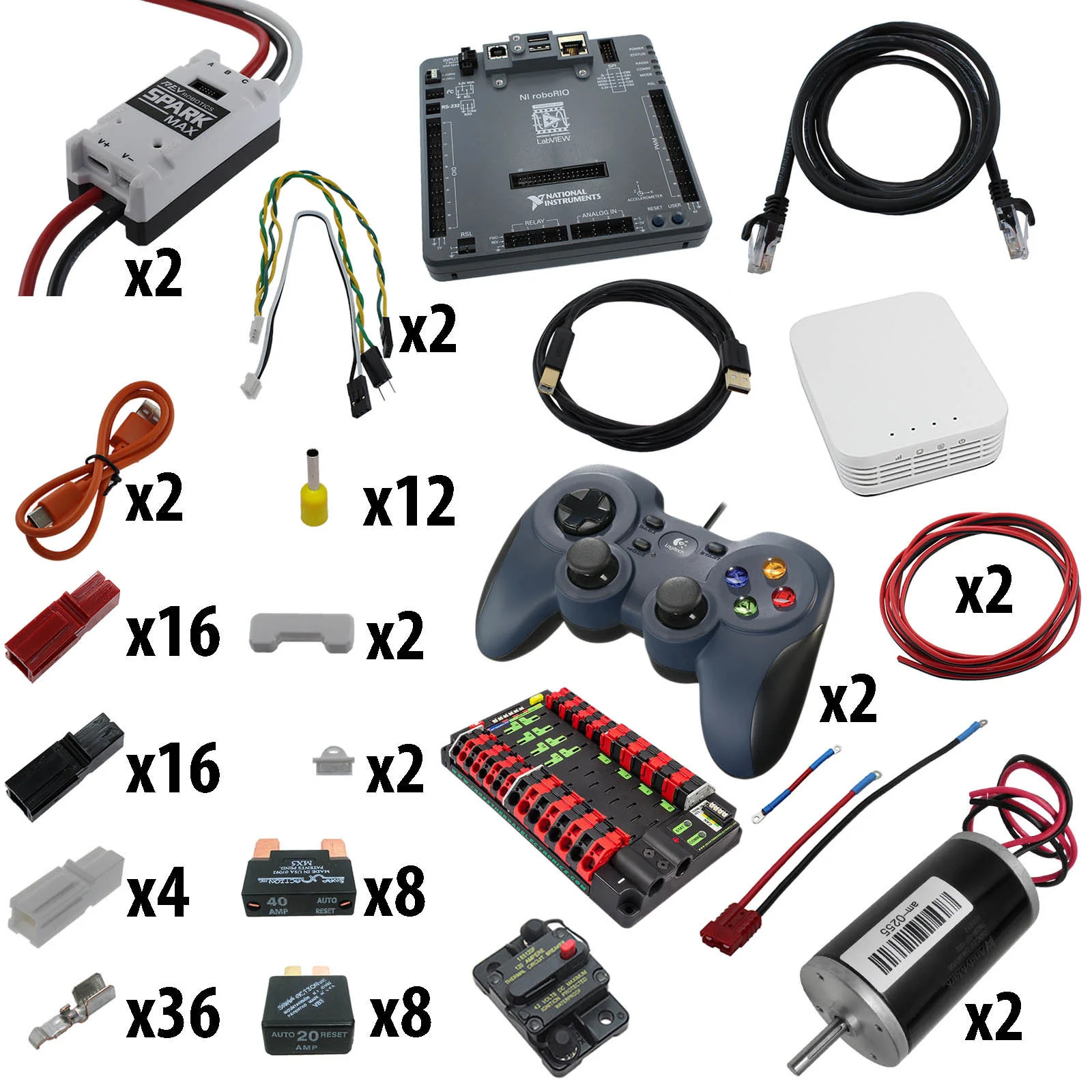
Electronics are the power and brains behind every incredible robot and machine. Figuring out all the individual pieces needed to make a robot go can be tedious which is why we've made it easy with this electronic bundles builder page!
Choose your processor, motor controllers, motors, and system components to create a complete electronics system to suit your needs. The only thing you'll need after configuring this Builder is a battery. For Mecanum chassis that you want to drive with a Radio Link controller you will need to purchase a Mecanum Mixer (am-2715b) to spin the wheels in the correct directions for translational motion.NOTE: Customers who are not affiliated with FIRST teams are required to purchase the NI roboRIO product through National Instruments, not AndyMark.
:
Understanding Part Numbers
Electronic bundles product numbers are built to identify components within the code. Below is the breakdown of how these part numbers are built.- The first two positions identifies the product number:
- BC - Bundle for Controls
- The third position identifies the controller and will come with components needed to hook it up (see link):
- F - roboRIO READY (BYOr) - Bring Your Own roboRIO - this kit matches the roboRIO one exactly, it just doesn't have a roboRIO in it, so if you have your own, this is perfect for you.
- L - RadioLink - a simplistic approach of a simple Radio Control with limited programming capability in the controller
- N - No Processor - so you'll need to have your own controller.
- R - roboRIO - the fully capable controller used within FIRST Robotics Challenge
- The fourth position identifies the motor controller and will come with the components needed to hook it up (see link):
- X - SPARK Max - multiple possible inputs, able to control both brushed and brushless motors
- The fifth position identifies the quantity of motors and will come with wires needed to hook them up:
- 2 - Two Motors
- 4 - Four Motors
- The sixth position identifies the type of motor:
- The seventh position identifies the type of power distribution and will come with components needed to hook them up (see links):
- B - ATC 8 Gang Fuse Block - lightweight single input terminal for simple power distribution
- 3 - PP45 Power Board - simple and compact power distribution with PP45 secure connections
- The first two positions identifies the product number:
Electronic Bundles Builder—
Product Information
Product Information
Shipping & Returns
Shipping & Returns
Description
- Description
-
Electronics are the power and brains behind every incredible robot and machine. Figuring out all the individual pieces needed to make a robot go can be tedious which is why we've made it easy with this electronic bundles builder page!
Choose your processor, motor controllers, motors, and system components to create a complete electronics system to suit your needs. The only thing you'll need after configuring this Builder is a battery. For Mecanum chassis that you want to drive with a Radio Link controller you will need to purchase a Mecanum Mixer (am-2715b) to spin the wheels in the correct directions for translational motion.NOTE: Customers who are not affiliated with FIRST teams are required to purchase the NI roboRIO product through National Instruments, not AndyMark.
:
Understanding Part Numbers
Electronic bundles product numbers are built to identify components within the code. Below is the breakdown of how these part numbers are built.- The first two positions identifies the product number:
- BC - Bundle for Controls
- The third position identifies the controller and will come with components needed to hook it up (see link):
- F - roboRIO READY (BYOr) - Bring Your Own roboRIO - this kit matches the roboRIO one exactly, it just doesn't have a roboRIO in it, so if you have your own, this is perfect for you.
- L - RadioLink - a simplistic approach of a simple Radio Control with limited programming capability in the controller
- N - No Processor - so you'll need to have your own controller.
- R - roboRIO - the fully capable controller used within FIRST Robotics Challenge
- The fourth position identifies the motor controller and will come with the components needed to hook it up (see link):
- X - SPARK Max - multiple possible inputs, able to control both brushed and brushless motors
- The fifth position identifies the quantity of motors and will come with wires needed to hook them up:
- 2 - Two Motors
- 4 - Four Motors
- The sixth position identifies the type of motor:
- The seventh position identifies the type of power distribution and will come with components needed to hook them up (see links):
- B - ATC 8 Gang Fuse Block - lightweight single input terminal for simple power distribution
- 3 - PP45 Power Board - simple and compact power distribution with PP45 secure connections
- The first two positions identifies the product number: