Digital Button Sensor - AndyMark Standard Sensors
- Description
-
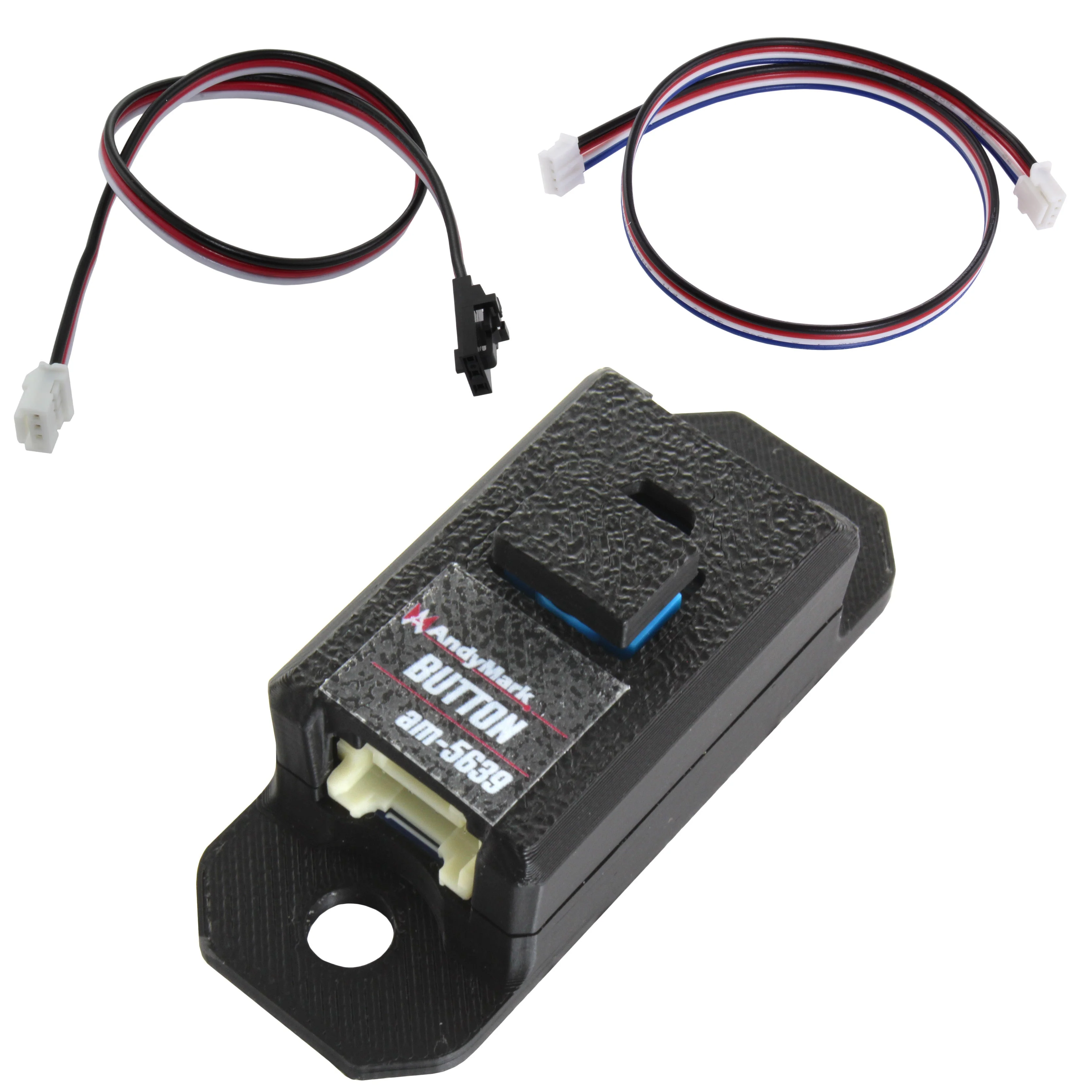
The Button / Touch Sensor is a simple, reliable digital switch designed to detect physical contact or user input in robotics applications. It provides a clean on/off signal when pressed, making it ideal for detecting mechanism limits, driver overrides, or contact-based events.
Whether you're confirming a mechanism has reached its endpoint or detecting when a game piece presses against a surface, the Button sensor offers a straightforward and dependable digital signal-perfect for fast-paced match play.
How to use
Mount the Button so that it is physically pressed when the desired condition occurs. When the button is actuated, the sensor changes state and outputs a digital LOW, which can be read by your control system.
Common setup tips
- Position the button so it is fully and consistently pressed at the intended trigger point.
- Use a rigid mounting surface to prevent inconsistent activation from vibration.
- Avoid partial presses-ensure your mechanism provides enough travel to clearly actuate the switch.
- Use software debounce logic if needed to prevent rapid signal toggling.
- Use the sensor state to trigger actions like stopping motion, indexing, enabling a subsystem, or signaling driver feedback.
When to use this sensor
- Detecting mechanism end-of-travel (classic limit switch use).
- Confirming a mechanism has physically reached a position.
- Detecting contact with a game piece.
- Providing a manual reset or override button.
- Verifying a latch, gate, or linkage has physically engaged.
- Creating a simple “home” input for zeroing routines.
Typical integrations
- Mount at the bottom of an elevator to detect the home position for zeroing.
- Install on an arm to detect stowed or scoring positions.
- Place behind an intake roller to detect when a game piece is fully seated.
- Add to a climber latch to confirm engagement before loading force.
-
- Button Travel: 0.1250 in.
- Communications: Digital Input
- Connector Type: JST PA (BM04B-PASS-1-TFT)
- Height: 0.75 in.
- Length: 2 in.
- Max Input Voltage: 16V
- Mounting Geometry: 1/2" pitch, holes 1.5" apart
- Nominal Voltage: 3.3V
- Output Type: Active LOW
- Width: 0.51 in.
Product Information
Product Information
Shipping & Returns
Shipping & Returns
Description
- Description
-
The Button / Touch Sensor is a simple, reliable digital switch designed to detect physical contact or user input in robotics applications. It provides a clean on/off signal when pressed, making it ideal for detecting mechanism limits, driver overrides, or contact-based events.
Whether you're confirming a mechanism has reached its endpoint or detecting when a game piece presses against a surface, the Button sensor offers a straightforward and dependable digital signal-perfect for fast-paced match play.
How to use
Mount the Button so that it is physically pressed when the desired condition occurs. When the button is actuated, the sensor changes state and outputs a digital LOW, which can be read by your control system.
Common setup tips
- Position the button so it is fully and consistently pressed at the intended trigger point.
- Use a rigid mounting surface to prevent inconsistent activation from vibration.
- Avoid partial presses-ensure your mechanism provides enough travel to clearly actuate the switch.
- Use software debounce logic if needed to prevent rapid signal toggling.
- Use the sensor state to trigger actions like stopping motion, indexing, enabling a subsystem, or signaling driver feedback.
When to use this sensor
- Detecting mechanism end-of-travel (classic limit switch use).
- Confirming a mechanism has physically reached a position.
- Detecting contact with a game piece.
- Providing a manual reset or override button.
- Verifying a latch, gate, or linkage has physically engaged.
- Creating a simple “home” input for zeroing routines.
Typical integrations
- Mount at the bottom of an elevator to detect the home position for zeroing.
- Install on an arm to detect stowed or scoring positions.
- Place behind an intake roller to detect when a game piece is fully seated.
- Add to a climber latch to confirm engagement before loading force.
-
- Button Travel: 0.1250 in.
- Communications: Digital Input
- Connector Type: JST PA (BM04B-PASS-1-TFT)
- Height: 0.75 in.
- Length: 2 in.
- Max Input Voltage: 16V
- Mounting Geometry: 1/2" pitch, holes 1.5" apart
- Nominal Voltage: 3.3V
- Output Type: Active LOW
- Width: 0.51 in.